
Experience DRT.fm faster and easier with our mobile and desktop app options.
Whether you’re chatting with your futa companions, generating spicy images, or exploring new characters, installing DRT.fm makes everything smoother and just one tap away.
You can install DRT.fm as a Web App (PWA) on any device, or download the Android APK if you prefer a traditional install.
Option 1: Install the DRT.fm Web App (PWA)
Works on iPhone, Android, Windows, and Mac
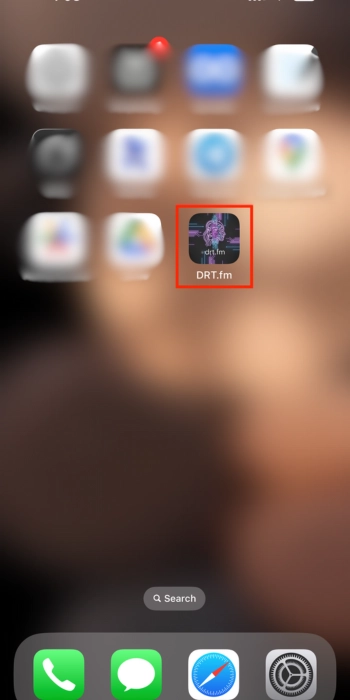
The DRT.fm Web App adds an icon to your home screen or desktop and opens just like a normal app — full-screen, fast, and without needing an app store.
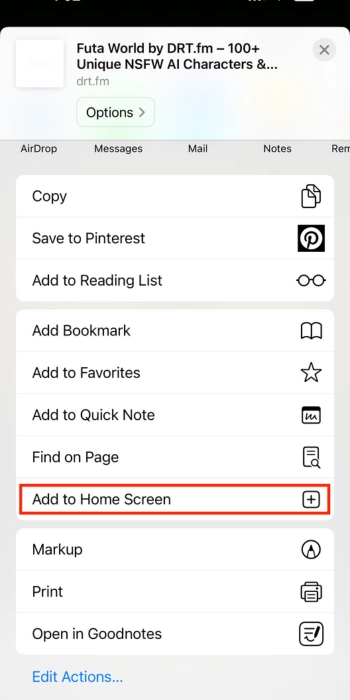
iPhone / iPad (Safari)
- Open drt.fm in Safari
- Tap the Share icon
- Tap Add to Home Screen
- Confirm Add


Android (Chrome)
- Open drt.fm in Chrome
- Tap the three dots (⋮)
- Select Install App or Add to Home Screen
- Confirm
PC / Mac (Chrome)
- Visit drt.fm
- Click the Install icon in the address bar
- Select Install

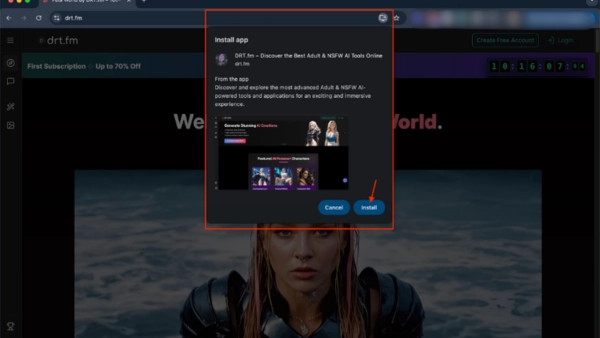
The PWA gives you the full DRT.fm experience. You get fast access, cleaner layout, and no need to keep tabs open.
Option 2: Download the Android App (.apk)
Works on Android devices only
If you prefer a traditional native-style installation, you can use our official APK.
Download for Android (.apk)How to Install the APK
Since this is a direct download (not from Google Play), Android will ask for permission once.
1. Download the file
Tap the download button. The DRTfm.apk file will appear in your Downloads folder.
2. Open the APK
Open it from your:
- Notification tray
- or Files → Downloads
3. Allow installation
Android will show a security message. This is normal.
- Tap Settings
- Turn on Allow from this source for your browser
4. Install
Tap Back, then tap Install. The app will appear on your home screen instantly.
Using an iPhone or iPad?
APK files only work on Android.
To install DRT.fm on iOS, use the Web App steps above:
Safari → Share → Add to Home Screen.
Why install DRT.fm as an app?
- Faster chat loading
- Instant access from home screen
- Better layout for mobile
- Saves your active conversations
- Smooth image generation
- Full-screen experience
Whether you choose PWA or APK, you get the same powerful DRT.fm features — futa chat, AI companions, memory, voices, images, and more.
Need help?
Visit drt.fm/contact
We’re here to assist with installation or troubleshooting.
